
Part of the veterinary AI in the room
Booking built for the vet on the road
For house calls, farm work, and mobile specialists, the hard part was never capturing the booking. It was the order of the day. AI Remote Booking arranges each day’s visits by travel distance and drive time, on one clear map, and learns how you like to work. Less zig-zagging across town, less driving, and a finish time you can count on.
Your mobile day, arranged as a route, not a random list of stops.
Free trial, then a $39 a month add-on to Professional or Elite, included in Enterprise. Works alongside whatever your clinic already runs.
Four visits, four corners of the county, and no plan for the drive.
You have a vaccination across town at 9, a farm call an hour out, an echo back near the clinic, and a house call somewhere in between. A regular booking app captured every detail perfectly, then dropped them on the calendar in the order they came in. So the day zig-zags: out, back, out again. You burn the morning in the car and finish long after you meant to.
Just Viggo it.
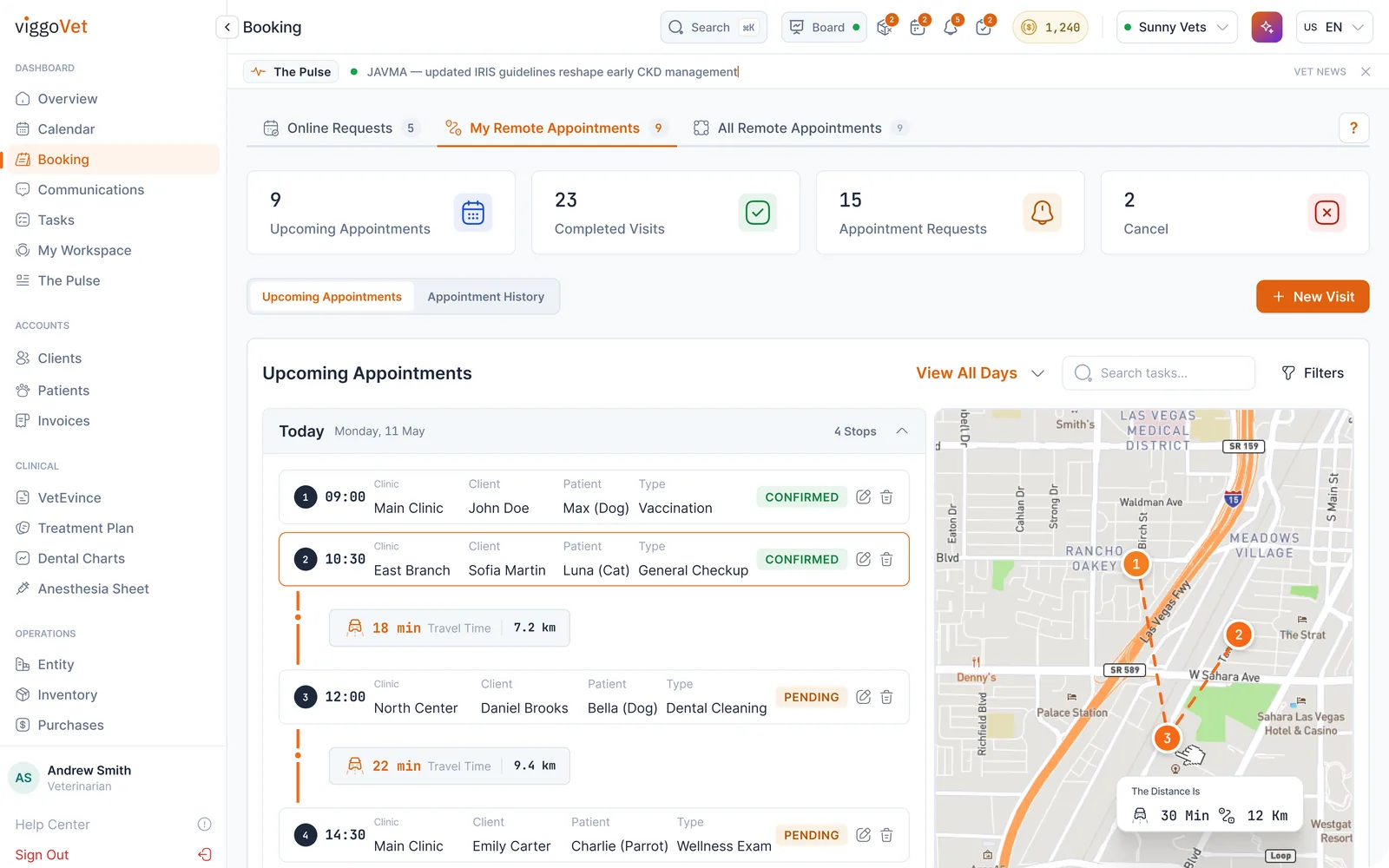
AI Remote Booking takes the same visits and orders them into a real route (nearest to farthest the way you prefer to work, drive time and traffic accounted for) and shows the whole day on one map with the total driving time in a single number. The visits don’t change. The driving does.
Four steps. A day that drives itself into order.
- 01
Set where your day starts, and how far you’ll go.
For each traveling provider, set a base location (home or the clinic) and a booking radius. Visits inside that radius can be booked to that provider, and the map shows the coverage area. This one setting keeps the mobile day sane.
- 02
Share your booking link with clients and partner clinics.
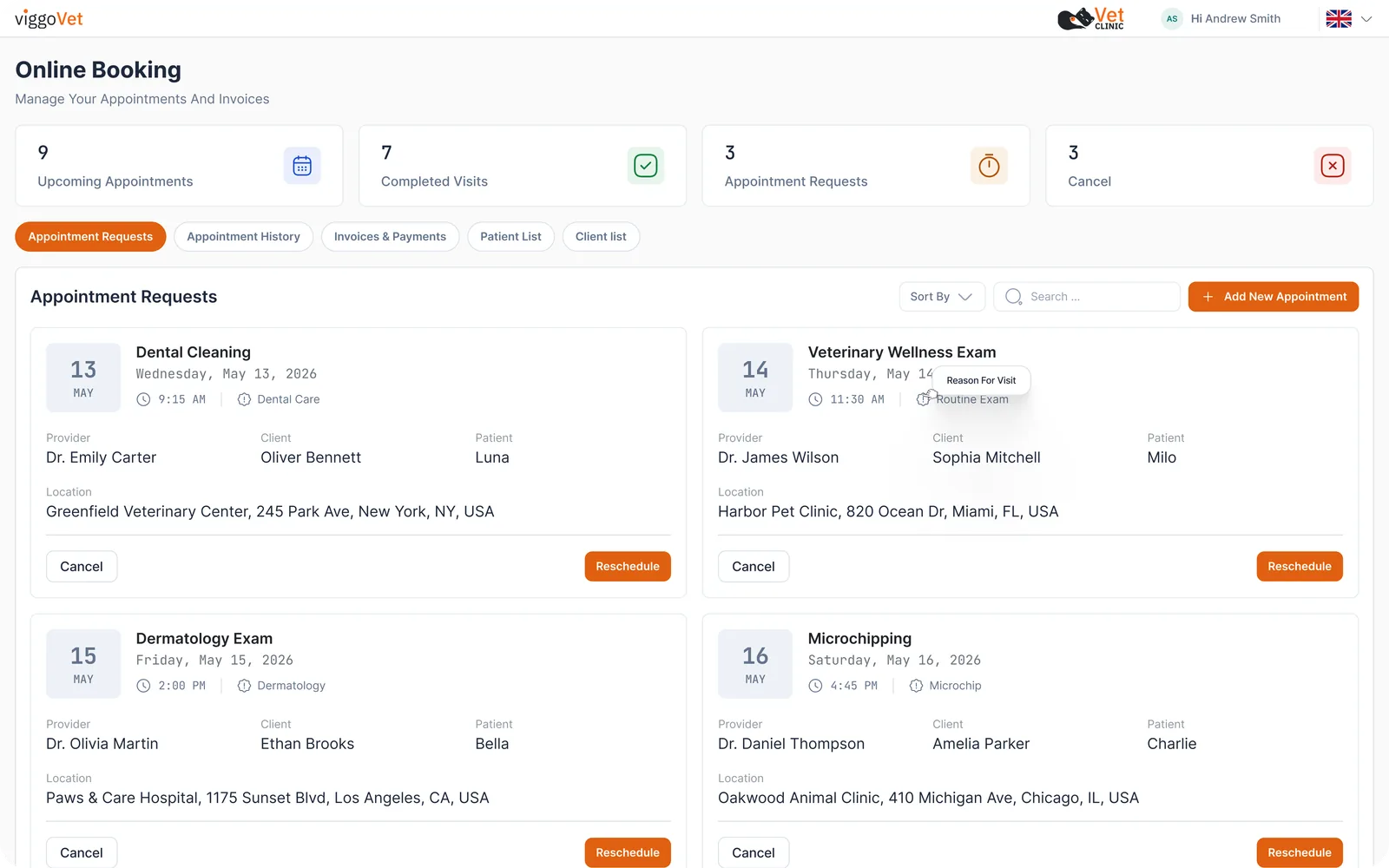
Clients and businesses book at their own location through your portal. They drop the address on a map, pick an available provider, choose a slot, and enter the pet’s details, optionally uploading previous records.
- 03
Review each request, then confirm.
Incoming requests arrive with the patient, the complaint, and the exact address, and one tap opens it in Google Maps. Confirm, reassign to another provider, or adjust the time, and drop each visit into the right calendar category.
- 04
Drive the route, not the list.
Your day appears as numbered stops in travel order, with the drive time and distance between each one, on a map with a route summary. Multi-day ranges stack day by day, so a whole week of mobile work is one clear picture.
What you get.
A day ordered as a route.
Every stop numbered in the order you will drive it, with drive time and distance between each, and a map of the whole day. The route summary totals the driving time, so you know the real cost of the day before it starts.
AI that learns your pattern.
Some vets start with the farthest visit and work back, some start close and push out, and some leave the order as booked. Over the first 30 to 60 days, the AI learns which one is you, and offers slots that fit, with drive time and typical traffic built in. You can adjust any stop at any time, and it keeps learning.
A booking radius per provider.
Set how far each traveling provider will go. Requests outside the radius are not offered to them, so the day never fills with drives no one wanted to make.
A portal for clients and partner clinics.
Individuals book visits to their own address, and businesses (including first-opinion clinics booking a visiting specialist) book from their own dashboard and manage their requests and history in one place.
Records that arrive as a patient, not a PDF.
When a client uploads the pet’s history during booking, the AI imports it as a full patient profile you can summarize and work from, rather than an attachment you squint at on the road.
Keep your software. Add the day that plans itself.
AI Remote Booking is a viggoVet module, not a system to migrate to. It runs alongside whatever practice software your clinic already uses. Keep your records, your billing, and your routines, and add the route intelligence mobile practice never had. Clients can also pay at booking through Stripe when it is connected. See how it fits alongside your software →
Your route, your patients, your data.
Drive times and distances are estimates based on each visit’s location and typical traffic, a plan for the day rather than a promise about the road. And every patient’s information stays yours: encrypted, held in your region, and shared only on the permissions you grant.
GDPR-aligned · End-to-end encrypted · Data stored in your region · Never used for AI training
Try it on next week’s route.
Free trial, then a $39 a month add-on to Professional or Elite, included in Enterprise. Full features during the trial. Card verification at signup. Cancel anytime during the trial at no charge. See transparent pricing →
Part of the viggoVet platform.
AI Remote Booking is one module of viggoVet, the open veterinary platform. The platform completes any practice software with the clinical AI it's missing, hosts the tools other veterinary companies build on it through its marketplace, and can run a whole practice end to end for clinics that choose it. Start with the module that solves today's problem; the platform is there as you grow.
Common questions
Who is AI Remote Booking for?
Mobile and ambulatory practice: house-call vets, farm and equine practitioners, and mobile specialists who travel to perform appointments inside other clinics. If your practice goes to the patient instead of the patient coming to you, this is built for your day.
How does the route ordering work?
Your day’s visits are arranged by travel distance and drive time and shown as numbered stops on a map, with the drive time between each and a total for the day. The AI learns your preferred pattern (farthest-first, closest-first, or as-booked) over roughly the first 30 to 60 days, and offers slots that fit it. You can adjust any stop at any time.
Do clients and partner clinics book themselves?
Yes. Individuals book visits to their own address, and businesses, including first-opinion clinics booking a visiting specialist, book from their own dashboard. They choose the location on a map, pick an available provider, choose a slot, and enter the pet’s details, and can upload previous records, which the AI imports as a full patient profile.
What controls how far a visit can be booked?
Each traveling provider has a base location and a booking radius. Requests outside that radius are not offered to that provider, so the day never fills with drives no one wanted to make. An administrator sets this per provider.
Does it replace my practice software?
No. AI Remote Booking works alongside whatever your clinic already runs. Nothing is ripped out or migrated. You add the route intelligence, keep everything else where it is, and clients can pay at booking through Stripe when it is connected.
What does it cost after the trial?
AI Remote Booking is a $39 a month add-on to Professional ($49) or Elite ($79), and included in Enterprise. The free trial is full-featured. Card verification is required at signup, and if you cancel during the trial you pay nothing.
Next week’s route can plan itself.
Set your base and your radius, share your booking link, and see your mobile day arrive in order. Free to try, alongside whatever you already run.
Free trial · No card charged during trial